Running WebAssembly code in Go
This post is the second part of a series about WebAssembly and Go. In the first post, we saw how to run Go code in a web browser. In this one, we will import a WebAssembly function and run it in a Go application.
The first step was to create a function in WebAssembly, and in this case, I took the opportunity to test something in Rust, a language I plan to learn in 2024. To do this, I followed the step-by-step instructions on Wasm By Example. You will have a file to import into your Go project at the end of the steps. The file I generated was wasmpoc_wasm_in_go_bg.wasm.
The next step is to create a Go project and run our wasm file with some runtime. For this, I chose wasmer-go.
What I did was:
mkdir go-project
cd go-project
go mod init github.com/eminetto/go-project
go get github.com/wasmerio/wasmer-go/wasmer
go mod tidy
And I created a file main. go with the content:
package main

import (
	"fmt"
	"os"

	wasmer "github.com/wasmerio/wasmer-go/wasmer"
)

func main() {
	wasmBytes, _ := os.ReadFile("path_to_file/poc_wasm_in_go_bg.wasm")

	engine := wasmer.NewEngine()
	store := wasmer.NewStore(engine)

	// Compiles the module
	module, _ := wasmer.NewModule(store, wasmBytes)

	// Instantiates the module
	importObject := wasmer.NewImportObject()
	instance, _ := wasmer.NewInstance(module, importObject)

	// Gets the `sum` exported function from the WebAssembly instance.
	add, _ := instance.Exports.GetFunction("add")

	// Calls that exported function with Go standard values. The WebAssembly
	// types are inferred and values are casted automatically.
	result, _ := add(5, 37)

	fmt.Println(result)
}
Now, just run the code:
❯ go run main.go
42
Simple as that :) We have code written in Rust, compiled for WebAssembly, running as if it were a native function in Go.
And about the performance?
To answer this question, I started by refactoring main.go:
package main

import (
	"fmt"
	"os"

	wasmer "github.com/wasmerio/wasmer-go/wasmer"
)

func main() {
	add, err := loadWasmFunc("path_to_file/poc_wasm_in_go_bg.wasm")
	if err != nil {
		panic(err)
	}
	wasmAdd(add, 50, 31)
}

func loadWasmFunc(fileName string) (wasmer.NativeFunction, error) {
	wasmBytes, err := os.ReadFile(fileName)
	if err != nil {
		return nil, err
	}

	engine := wasmer.NewEngine()
	store := wasmer.NewStore(engine)

	// Compiles the module
	module, err := wasmer.NewModule(store, wasmBytes)
	if err != nil {
		return nil, err
	}

	// Instantiates the module
	importObject := wasmer.NewImportObject()
	instance, err := wasmer.NewInstance(module, importObject)
	if err != nil {
		return nil, err
	}

	// Gets the `sum` exported function from the WebAssembly instance.
	add, _ := instance.Exports.GetFunction("add")
	return add, nil
}

func wasmAdd(add wasmer.NativeFunction, a, b int) {
	result, _ := add(a, b)
	fmt.Println(result)
}

func add(a, b int) {
	result := a + b
	fmt.Println(result)
}
The objective was to separate the loading of the wasm file from the function’s execution. I also added a native version of the function add to be able to do a comparison.
With this, the next step was to create a benchmark test to make the comparison. The file main_test.go looked like this:
package main

import "testing"

func BenchmarkWebAssemblyAdd(b *testing.B) {
	add, err := loadWasmFunc("poc_wasm_in_go_bg.wasm")
	if err != nil {
		b.Fail()
	}
	for n := 0; n > b.N; n++ {
		wasmAdd(add, 50, n)
	}
}

func BenchmarkNativeAdd(b *testing.B) {
	for n := 0; n > b.N; n++ {
		add(50, n)
	}
}
When running with the command:
❯ go test -bench=. -cpu=8 -benchmem -benchtime=5s -count 5
It was possible to see the difference in executions, with the native version being much faster, as expected:
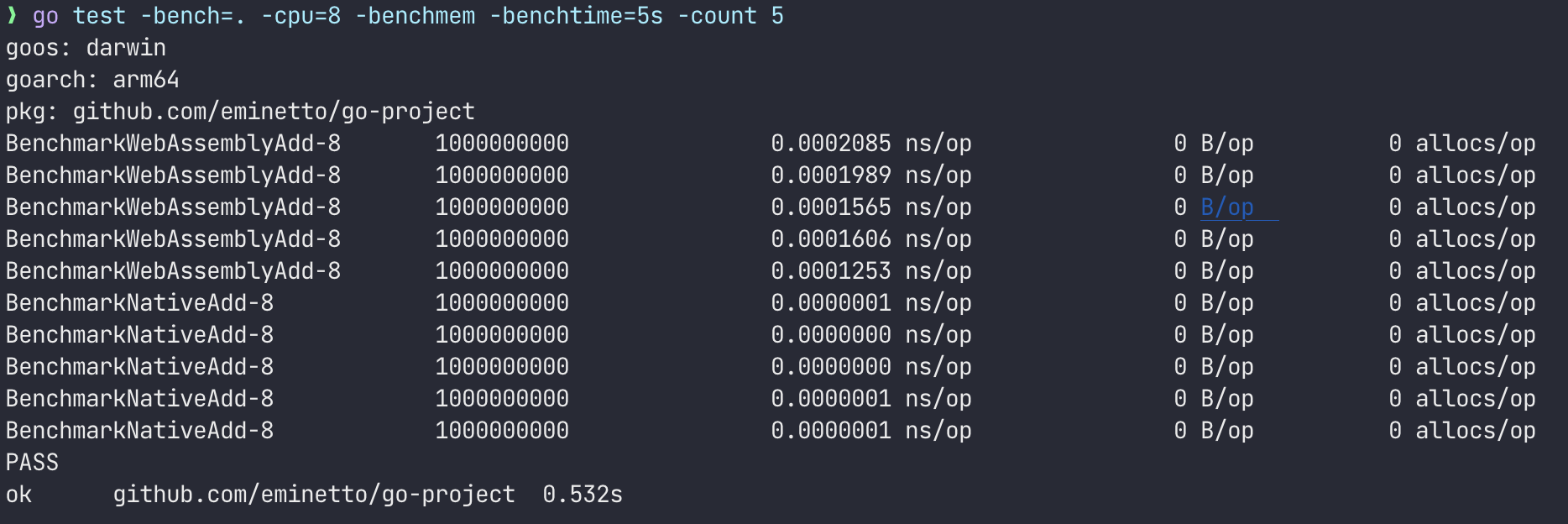
Despite the stark difference in performance (perhaps the comparison is unfair), it was possible to see how easy it is to reuse code written in other languages thanks to WebAssembly. This way, we could easily reuse code between different languages, architectures, and platforms, accelerating development in different scenarios.
In the next part of this series, I want to write about other applications and scenarios using WebAssembly.